
School asset, inventory and compliance management

One place for the everyday IT jobs schools cannot afford to lose track of.

Track assets, PAT testing, software, Chromebooks, policies, forms, training, first aid checks, fire checks and operational reports from a platform designed around real school workflows.

Asset control Rooms, staff, learners, parents, QR codes and audit history
Device visibility Windows agents, Chromebook extension and software policy checks
Compliance workflows PAT, policies, training, forms, first aid, fire doors and reports

Platform

Built for the mix of IT, site and compliance work schools actually manage.

School Track IT brings connected workflows into one permission-based portal, so teams can move from asset records to checks, evidence, reports and device inventory without maintaining separate spreadsheets.

01

Asset management

Create single or multiple assets, use quick-add presets, upload images and files, assign items to staff, learners or parents, move equipment between rooms, split quantities, track status changes and keep a full activity log.

  • QR and PAT QR workflows
  • Room, category, user and learner views
  • Disposal, restore and archive handling

02

PAT and room audits

Keep PAT due dates, tester assignments, retest status and asset seen checks visible from web and mobile workflows.

03

Reports and search

Use fixed reports, saved reports, printable HTML reports and advanced asset search for data quality, audit, room, category, disposal and PAT views.

Answers when you need them

Built around the questions schools ask every week.

Instead of hunting through spreadsheets, inboxes and paper folders, School Track IT turns common operational questions into searchable records, dashboards and reports.

Fire and site checks

How do you know every fire alarm test has been done?

Fire call point and fire door records show test history, current status, overdue checks and evidence for site teams or auditors.

Policy signing

Who still has not signed the safeguarding policy?

Policy signing and review dashboards show outstanding signatures, reminders, signed confirmations and review activity.

PAT testing

Which laptops are due PAT next month?

PAT dates, assigned testers, QR scanning and due-soon reports make upcoming electrical safety checks easy to find.

First aid

Show me every first aid kit needing replenishment.

First aid kit contents, expiry dates and check records highlight missing or expiring items before they become a problem.

Training

Which staff have expired training?

Training records track mandatory courses, refresher dates, certificate status, reminders and completion statistics.

Assets and devices

Which devices are missing, stale or no longer compliant?

Asset status, audits, inventory agent health, software policy findings and Chromebook check-ins help identify what needs attention.

Inventory

See what is installed, what is missing and what needs attention.

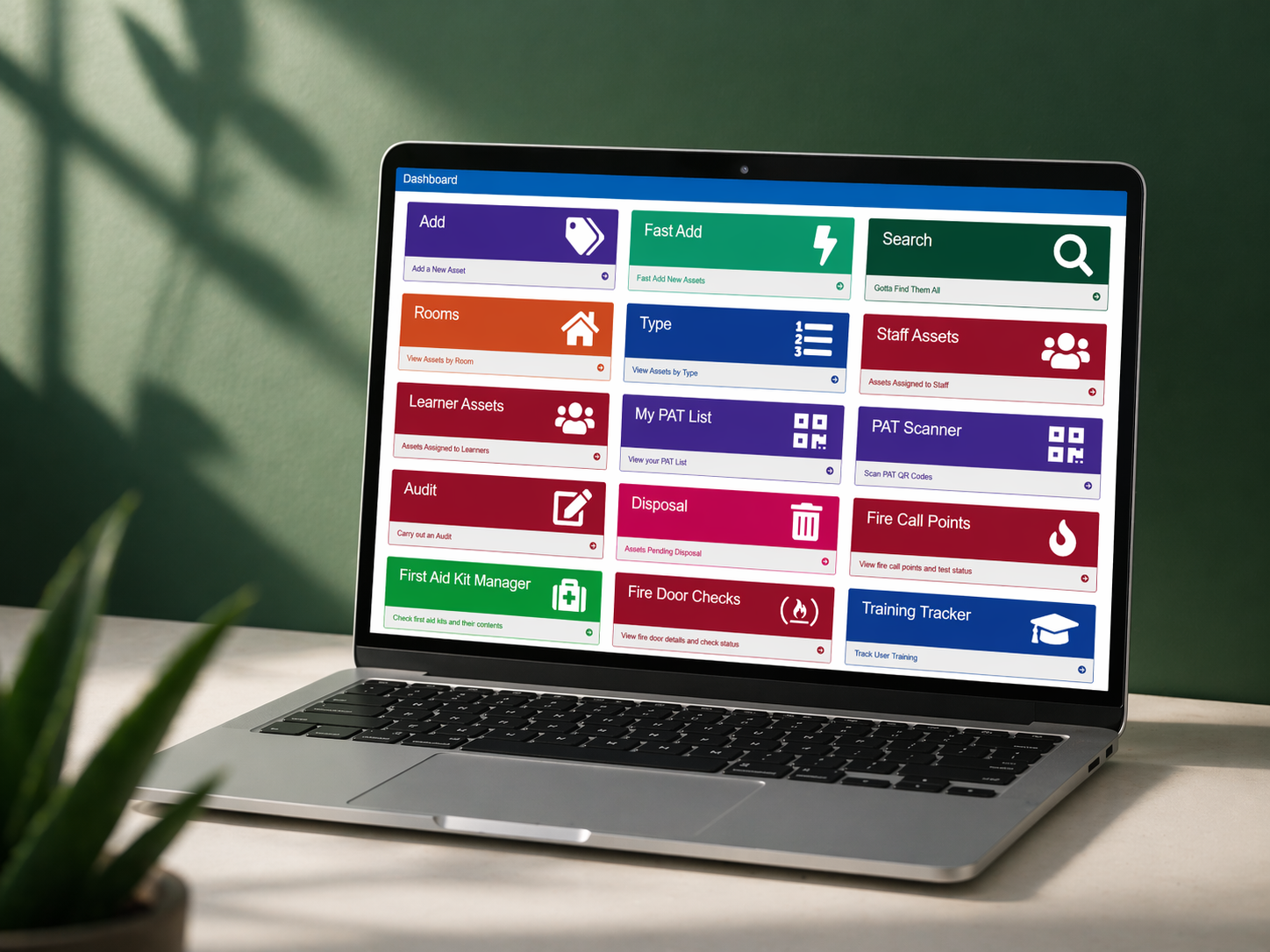
School Track IT dashboard on a laptop

Windows inventory agent

Enroll managed Windows devices, collect hardware, operating system, disk, software and usage data, then link agents back to asset records.

Software policies

Review installed versions, prohibited software, required software and minimum-version findings from the software catalogue and inventory reports.

Chromebook extension

Deploy a managed Chrome extension with site URL and enrollment policy to support Chromebook inventory and usage check-ins.

Agent health alerts

Spot stale check-ins, failed uploads, old agent versions, Windows update age, unmatched devices and devices that need follow-up.

Compliance

Turn recurring checks into visible routines.

Policy manager

Create policies, manage versions, signing, review dates, reminders, public signing links, Google Drive folders and review workflows with diff and archive support.

Forms manager

Build internal or public forms, collect responses, capture signatures, email submissions and review response records.

Training, CPD and PDR

Track mandatory training, refresher cycles, certificates, staff profiles, CPD requests, approvals, booking status and PDR records.

Site checks

Manage first aid kits, fire call points, fire doors and drill records, with check history, expiry visibility and reminder tasks.

Operations

Tools for the IT office as well as the classroom.

Printer monitoring and toner stock

Monitor printers, link printers to assets, manage models, consumables, toner stock, movements, low-stock alerts and stock reports.

Infrastructure monitoring

Use the infrastructure monitor API for network device temperature readings, stale check-in visibility and warning or critical status reporting.

Admin and permissions

Control roles, permissions, accounts, sessions, site configuration, maintenance mode, email templates, imports and reference data.

Apps and agents

Support field work and managed-device visibility without making downloads public.

Android

Mobile app

Asset search, scanning, room work, PAT workflows, reports and site checks for staff working away from a desk.

Windows

Inventory agent

Managed MSI deployment for Windows inventory, with enrollment tokens and proxy-aware installation support.

ChromeOS

Chromebook extension

Managed Chrome extension deployment for Chromebook inventory and usage check-ins through admin policy.

Support

Implementation help from people who understand school IT.

Getting started

Import or create rooms, categories, staff, learners, parents and assets. Configure permissions, email, policy review settings, software inventory and scheduled tasks.

Ongoing maintenance

Use health checks, version records, maintenance mode, appdata storage checks, mail queue processing, retention cleanup and upgrade tooling to keep customer sites stable.

Custom workflows

Adapt forms, reports, approval steps, site checks and module visibility so each school gets a system that fits how its team already works.

Questions

Useful answers before a demo.

Can users only see what they are allowed to use?

Yes. Menus, reports and actions are permission-aware, with role-based access controlling asset, report, admin, inventory, policy and module permissions.

Does it support public forms and policy links?

Selected workflows use controlled external links, including forms, policy signing, policy review decisions and staff training or CPD profile actions.

Can it support mobile workflows?

Yes. The mobile API supports asset search, lookups, audits, PAT, first aid, fire checks, reports and user preferences for the Android app.

Does inventory replace asset records?

No. Inventory agents add device visibility and matching suggestions while asset records remain the operational source for ownership, rooms and lifecycle state.

Book a walkthrough

See the platform against the workflows your school already runs.

We can walk through asset tracking, mobile scanning, PAT, software inventory, Chromebook monitoring, policy review, reports and the modules most relevant to your team.

Or email support@schooltrackit.co.uk.